
A practical guide for urgent care centers adding employer physicals and going beyond DOT Physicals.
You run an urgent care center, and you are adding occupational health. Employer physicals, DOT exams, drug screen collections, clearance letters, and the employer relationships that come with all of it.
Here is the part nobody tells you: the medicine is the easy part. Unless dealing with industrial employers in very specific fields, you already know how to examine a typical new hire. What is brand new to you is the program, meaning the set of documents, protocols, and information-sharing rules that turn individual exams into a service employers can rely on. Clinics that get this right on day one run smoother, sign employers faster, and sleep better during audits. Clinics that wing it spend the next two years paying for it.
This guide is about starting clean. No software pitch, no billing advice, no contract templates. Just the paperwork side of occupational medicine, and how to design it so it never becomes a mess in the first place.
Occupational health is three-party medicine
Ordinary urgent care is two-party medicine: a provider and a patient. Occupational health adds a third party, the employer (or their third-party administrator) who orders the service, sets the requirement, often pays the bill, and expects a result.
Nearly every hard problem in occupational health paperwork is a consequence of that triangle. So it pays to understand how the ideal version of it works.
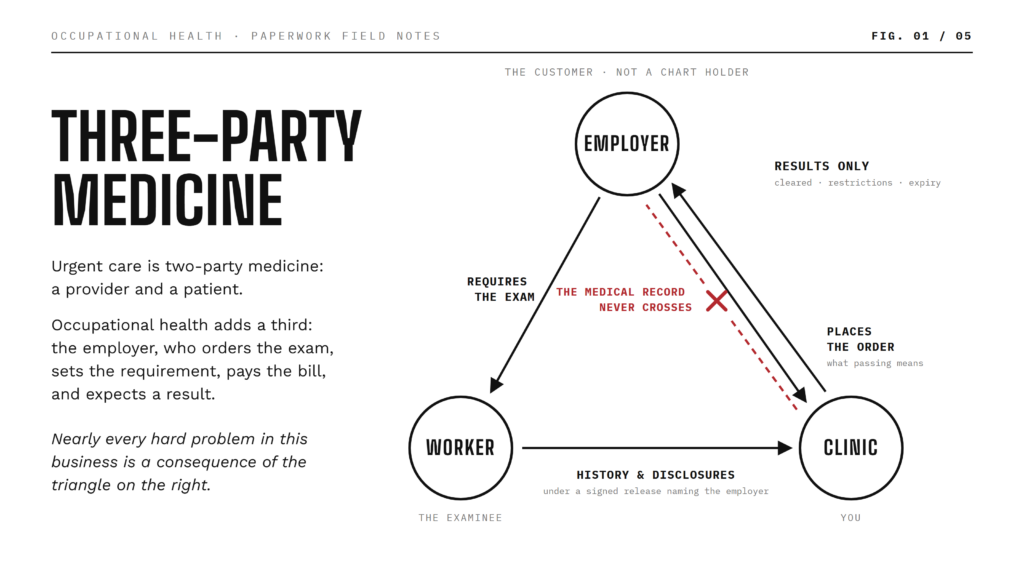
Picture three one-way flows. The employer starts two of them: they require the exam as a condition of the worker’s job, and they place the order with your clinic, including protocols, authorizations, and what “passing” means for them. The worker brings your clinic the sensitive material: their history, their disclosures, and the exam itself, under a signed release that names the employer. Your clinic closes the triangle by returning only the outcome: cleared or not cleared, restrictions, expiry dates.
Now notice the arrow that is missing. Nothing carries the medical record from your clinic to the employer. That missing arrow is the whole design. The employer’s share of what you know is results and outcomes only. Everything else stays on your side of the line.
Two consequences follow, and they shape everything else in this guide.
The employer is a customer, not a chart holder. Employers receive determinations. They generally do not receive the medical record that produced the determination. Designing your documents around this rule is the single most effective protection against accidental over-disclosure, and we will come back to it in detail below.
The paperwork is the product. In urgent care, the visit is the product and the chart documents it. In occupational health, the employer never sees the visit. They see the paperwork. An exam is not finished when the patient leaves. It is finished when the right document, with the right contents, reaches the right recipient, and the record of it is safely stored.
Paperwork debt: the enemy of day one
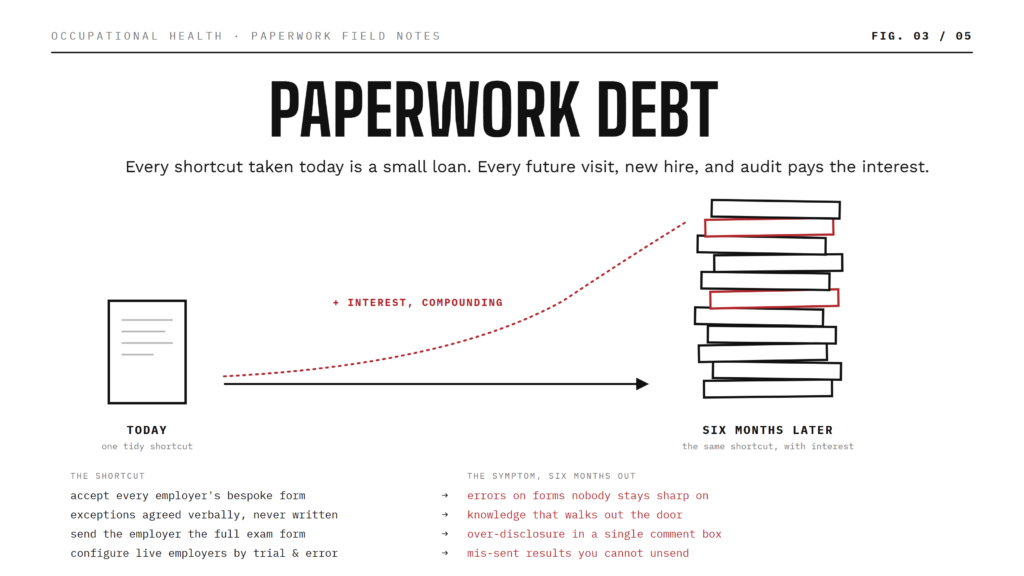
Software teams talk about technical debt. Every shortcut taken today is borrowed time that must be repaid later, with interest. New occupational health programs accumulate exactly the same kind of debt in their paperwork.
Every bespoke employer form accepted without review is a small loan. So is every undocumented exception (“only fax page 3 to Pat in HR”), every completed form that never got sent or filed, every record that never made it into your system of record. The interest gets paid by every future patient visit, every new hire you train, and every audit or records request you answer.
Here are the most common ways new programs go into debt, what the debt looks like six months later, and the day-one habit that prevents it.
| The shortcut today | The symptom in six months | The day-one prevention |
|---|---|---|
| Accepting every employer’s bespoke form to win the account | Staff unfamiliarity, errors on rarely used forms, waiting-room delays, complaints | A standard catalog, plus a decision gate for custom forms |
| Undocumented per-employer exceptions agreed verbally | Tribal knowledge that walks out the door when a veteran staff member leaves | A one-page protocol sheet for every employer |
| Sending the full exam form to the employer “because they asked” | Over-disclosure the moment a patient types something sensitive into a comment field | The two-document rule |
| Completed paperwork left sitting unsent and unfiled | Nothing delivered, nothing archived, and eventually records quietly lost | Same-day completion discipline |
| Ad hoc forms and silent revisions | Nobody knows which version is in force for which employer | A naming and versioning convention |
| Configuring a live employer by trial and error | Mis-sent results that cannot be unsent, and employers complaining they got nothing | A full test run before the first real patient |
If you are new to occupational medicine, sit with this for a second: you hold a genuine advantage over every established competitor in your market. You have zero paperwork debt. The rest of this guide exists to keep it that way.
Write the program down before you touch any software
Whatever platform ends up running your forms and your employer communications, it can only map a protocol you can write down. No software can invent a protocol you have never articulated.
Here is the test. Pick any employer you plan to serve. Could the newest member of your front desk write out that employer’s complete protocol from A to Z? Every service they order, every form used in each service, every document that leaves your clinic, every page of it, every recipient, the delivery method, the consent and payment arrangement, and every exception you have ever agreed to?
If the answer lives in one veteran staff member’s head, you do not have a program. You have habits. Habits do not scale, do not survive staff turnover, and cannot be handed to software, a new hire, or an auditor.
The fix is boring and it works: a one-page protocol sheet for every employer, written before that employer’s first patient walks in, kept current for as long as the relationship lasts. There is a template later in this guide.
The rule that follows: nothing gets configured, printed, or promised until it is written on paper first. If you hit a question you cannot answer from your own protocol sheets, stop. The gap is in your program, not in your tools – no software vendor can fix this for you!
Six kinds of documents, and why you should never mix them
Before creating a single form, agree on the classes of documents your program will use. Six classes cover an occupational health practice. Each has a different author and a different audience, and mixing them up is how over-disclosure happens.
| Class | Typical documents | Completed by | Who generally sees it |
|---|---|---|---|
| Consents and waivers | HIPAA release naming the employer, employer-specific waivers, declination statements | Patient | Clinic; filed with the record |
| Intake and history | Health history questionnaires, symptom screens, job-duty questionnaires | Patient | Clinic only |
| Exam and test forms | Physical exam forms, DOT and immigration exam forms, audiometric and drug-screen worksheets | Provider, with a patient portion where applicable | Clinic only, with narrow regulated exceptions such as the DOT certificate |
| Determinations | Clearance letters, fit-for-duty letters, certificates, sanitized result summaries | Provider | Employer or TPA |
| Supplementary attachments | Driver’s licenses, vaccination records, lab reports, prior records | Patient uploads; clinic attaches | Clinic; released file by file, only when explicitly required |
| Internal notes and worksheets | Administrative notes, internal checklists, billing summaries | Staff | Clinic only, never shared |
Notice the pattern in the last column. Only one class routinely leaves your clinic. Which brings us to the most important rule in this guide.
The two-document rule
Every service you offer to an employer should produce two documents, or two sets of documents.
The first is the clinical record: the complete exam form with history, free-text answers, and findings. It stays internal and gets exported to your system of record.
The second is the determination: a minimal, narrative-free document (clearance letter, certificate, result sheet) that is the only thing an employer ever receives.
If a service produces only one document today, design the second one before you launch or sell that service to any employer.
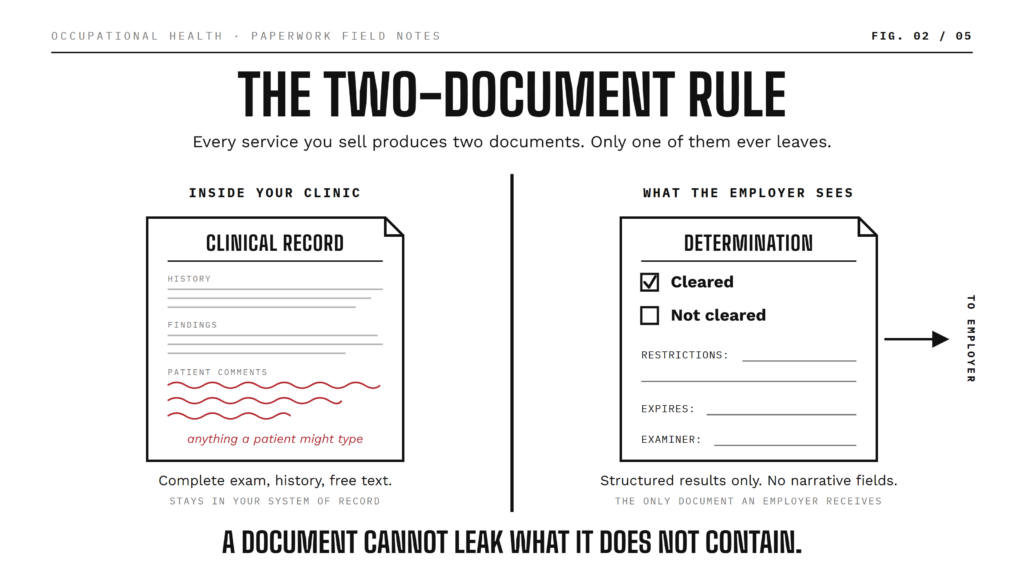
Why is “no narrative fields” the whole point? Because a form that is perfectly safe to send becomes legally radioactive the moment a patient volunteers something in a comment box. A medication. A diagnosis. A disability. A legally protected condition the employer must not know about under your state’s law. No software, no policy, and no amount of staff training can anticipate what a patient will type into a free-text field and whether that should be communicated to the employer or not.
A determination document that contains only structured results (cleared or not cleared, restrictions, expiry dates) cannot leak what it cannot contain. That is not a workflow preference. It is safety by construction.
The DOT Physical is the best example: Exam (often called the long form) is separate from the Certificate. And of course it goes without saying that multiple internal forms can have a single determination or “result sheet” and that is often the whole point of having a summarized result document for HR. The two-document rule isn’t a 1:1 mapping but allows multiple documents to have the same outbound corresponding document for the employer.
One caution for providers: even on a structured determination, a provider comment field deserves care. Keep provider notes on shared documents strictly to what the employer is entitled to know.
Standardize ruthlessly
The strongest paperwork decision you will make is also the least glamorous: keep your catalog small. A handful of standard physicals. One standard clearance letter design that serves most employers. One standard result sheet per test type. Employers opt into your paperwork, not the reverse.
Every additional form carries costs that never show up on an invoice. Your whole team must learn it, remember its exceptions, and execute it correctly under waiting-room pressure. Complexity, low frequency, and error risk travel together. This is exactly why many physicians decline unfamiliar physicals (the Coast Guard exam is the classic example). The issue is never ability. It is unfamiliarity. A form your team completes daily is an asset; a form your team sees quarterly is a liability wearing a revenue costume.
Three habits make standardization stick.
Fewer forms, deeper familiarity. Ten employers on one standard pre-employment physical beats ten employers on ten bespoke ones by every measure that matters: speed, error rate, training cost, and clinical confidence.
One determination to rule them all. Design one clearance and fit-for-duty letter with your branding, structured checkboxes, restriction fields, and an expiry date. Offer it to every new employer as the default deliverable. Most will accept it. Most employer “forms” exist only because nobody ever offered anything better.
Say yes slowly. When an employer insists on their own paperwork, run the decision gate below before agreeing. “We standardize so we never make mistakes on your people” is a sales argument, not an apology.
When to accept an employer-specific form
Sometimes a custom form is genuinely justified. A large account, a regulated industry requirement, a union agreement. The point is not to refuse everything. The point is to decide deliberately instead of reflexively. Before saying yes, answer these in writing:
- How many patients per month will actually use this form? A form for an employer who sends two people a year will be executed badly, because nobody stays sharp on paperwork they never see.
- Would the employer accept your standard determination letter instead? Ask. You will be surprised how often the answer is yes.
- Who pays for the build, and who pays when the underlying paperwork changes? Decide before the work starts, not after.
- Who on your team owns this form? Every accepted custom form needs an owner, a version number, and an annual review date, recorded on that employer’s protocol sheet.
An orphaned custom form is debt with no one making payments.
Patient-facing forms are not the same as provider forms
Draw a hard line between documents a patient touches and documents only your staff touch.
Anything patient-facing should be an accessible web form: guided intake, validation that catches errors as they happen, screen-reader and keyboard compatibility, and it should work on any phone. Fillable PDFs are fine for internal, provider-completed documents like result sheets and clearance letters, but they are not accessible to assistive technology and cannot be made so.
Your obligations under the ADA and related law are yours regardless of tooling. Never make a fillable PDF the only way a patient can provide information, and always offer staff-assisted completion or an accessible alternative on request. This is both a compliance matter and a throughput matter: an accessible intake form that patients complete on their own phone before arrival is the single biggest waiting-room win available to you.
Define every service exactly once
Your service catalog is the list of visit types you sell: DOT physical, non-DOT pre-employment physical, drug and alcohol screen collection, TB screening, respirator fit clearance, audiometric testing, fit-for-duty and return-to-work evaluations, immigration physicals, and so on.
Define each service exactly once, in three parts: what comes in, what happens, what goes out. For example, “Pre-Employment Physical plus Drug Screen” might look like this:
- Inputs: HIPAA release naming the employer, health history questionnaire, photo ID, medication list.
- The visit: physical examination per your medical director’s protocol, plus specimen collection.
- Outputs, internal: completed exam form, history, and collection worksheet, exported to your system of record.
- Outputs, employer: one clearance letter with structured fields only, plus a drug screen result summary.
- Delivery: exactly as written on that employer’s protocol sheet.
For example a “simple physical” for an employee working in grocery store could be a combination of (a) health history review, (b) vision, hearing, medications review, (d) drug testing results and (c) clearance letter. For a truck driver working for the very same grocery store we may want to additionally add a DOT Physical and for the same grocery store’s warehousing staff we may need to add a lift or comprehensive physical fitness test.
Your aim should be to have a clean, easily identifiable set of building blocks. The more building blocks you create for different employers/services (e.g., different forms with slight variations) the more complex and messy your occupational health program becomes.
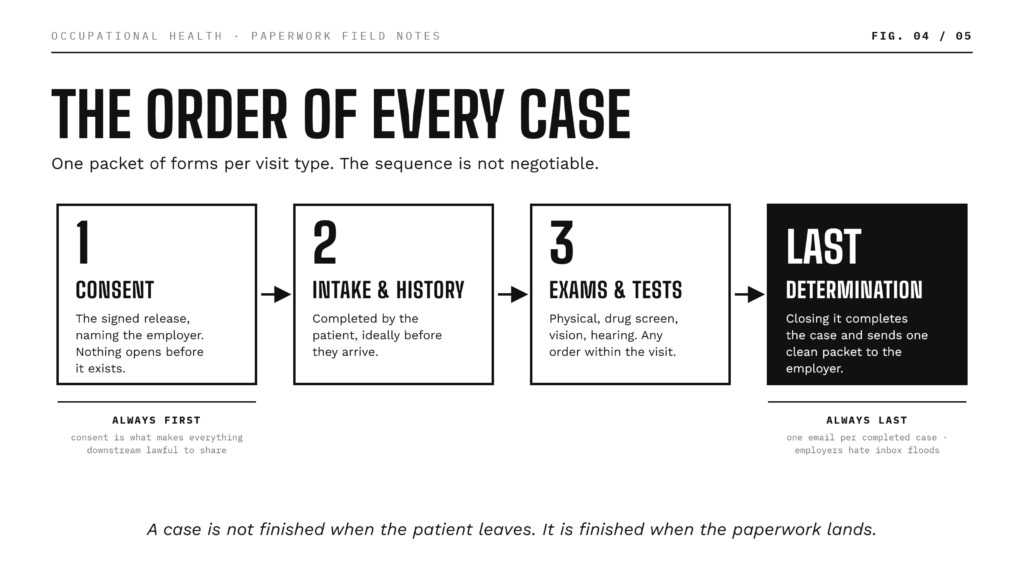
Sequence matters as much as content. Consent always comes first: nothing else should be completed before a signed release exists, because the release is what makes everything downstream lawful to share. The determination always comes last, because it is the document whose completion means the case is done and results can go out.
One more hard-won lesson: send employers one message per case, not one message per form. An employer whose new hire generates five separate emails for one visit will tell you exactly how they feel about it. Structure each service so there is a single, well-defined moment when the case is complete and one clean packet goes out.
What the worker owes you, and what you owe the worker
The person being examined is not a passive subject of this process. They are a participant with duties and rights, and a well-designed program makes the duties easy and the rights visible. Publish the expectations per service: a card with a QR code at the front desk, a checklist on your website, a reminder in the booking confirmation.
Before the visit, the worker completes their portion of the paperwork through a link before arrival and gathers what the service requires: photo ID or driver’s license, medication list, glasses or hearing aids, prior records, any waivers or exemption letters. You make this easy by sending the intake link at booking and publishing a per-service “bring with you” list, so nothing is a surprise.
At intake, the worker owes truthful, complete disclosure, and signs the release naming the employer who will receive results. You make this easy by presenting the consent before the intake questions open, and by being able to explain in plain words exactly which documents the employer will and will not see.
During the exam, the worker participates honestly and raises concerns about job duties or health issues. Your provider should be able to explain the difference between the medical record, which is private, and the determination, which is shared.
After the visit, the worker reviews their determination, notes expiry and renewal dates, and keeps copies. You provide copies of everything they signed or received.
Three rights belong in your standard operating procedures, not just in your good intentions:
- Accessibility. An accessible way to complete every patient-facing document: accessible web forms by default, staff-assisted completion, or an alternative format on request.
- Informed consent. The worker knows, before they disclose anything, exactly who will receive what. That is why the employer is named on the release and why consent comes first.
- The right to say no. A worker may ask that a specific document not be shared with the employer. You can honor that, while explaining the consequence honestly: the employer may then receive no determination at all, and resolving that is a conversation between the worker and their employer, not something your clinic papers over.
A note on falsification: on federally regulated exams, false statements by the examinee carry federal penalties. Your clinic’s duty is accurate recording and identity verification, not enforcement. Record what was disclosed, note discrepancies, and let the determination reflect the evidence.
The clinic’s side of the bargain
The worker’s duties are matched by yours, and most of them come down to unglamorous discipline.
If it is not finished, it did not happen. Adopt a hard rule that completed work is completed same-day: signed, locked, delivered, and filed. A perfect exam sitting in a drafts pile sends nothing to anyone, appears in no report, and has a way of quietly disappearing. Train every user that an exam is done when the paperwork is done, not when the patient walks out.
Correct in the open. Locked records exist for a reason, so never silently edit a completed document. The correction protocol: issue a corrected document, and always record what changed and why in an administrative note attached to the record. For results already submitted to a federal registry, corrections go through the registry’s own process, initiated by the submitting examiner.
Watch your outbound messages. Assign a person, by name and on a schedule, to review outgoing results monthly. Email is not a guaranteed medium: addresses get mistyped, mailboxes fill, spam filters eat things. In occupational health, the message to the employer is the deliverable, so an unnoticed bounce is an undelivered exam.
Write your own SOPs. Your protocol sheets plus the checklists in this guide are the core of a living SOP binder. Train new hires from the binder, not from memory, and update it whenever your systems or processes change.
The employer protocol sheet
Onboarding a new employer is structured intake, not a handshake and a first appointment. Before their first patient walks in, three things should exist, in this order: a completed protocol sheet, your systems configured to match it, and a successful end-to-end test.
The sheet is one page per employer, A to Z. The left column is the question, the right column is the answer your team agreed with the employer. If a row is blank, the relationship is not ready for patients.
What goes on it:
- Identity and contacts. Legal name, locations, TPA if any. Named contacts in HR and safety, with roles. Exactly who receives results, per document type.
- Delivery. Where each document goes, by what method, and precisely which pages. “Certificate only” and “full letter” are different promises; write down which one you made.
- Services and paperwork. Which visit types this employer orders. Which forms each service uses, with exact versions. Which determination document they receive, yours or theirs. Whether results go out per form or as one packet per completed case. Any employer-specific protocol details, since a physical or a lift test can carry different requirements from one employer to the next.
- Consent. Your standard release, or the employer’s custom waiver?
- Exceptions and governance. Every documented exception, each with an owner and a price. The sheet’s own version, owner, and next review date.
The empty answer column is the point. The sheet is a conversation script for employer onboarding. Walking a new employer through it surfaces every decision that would otherwise be discovered as a surprise, usually in front of a patient.
Keep the sheets alive. Review each one annually and at every contract change, and keep the sequence sacred: the contract changes, then the sheet is updated, then the configuration is changed to match, then you test, then you go. The moment a change appears in your systems before it appears on the sheet, the sheet stops being the truth. That is how debt starts.
Test before you trust
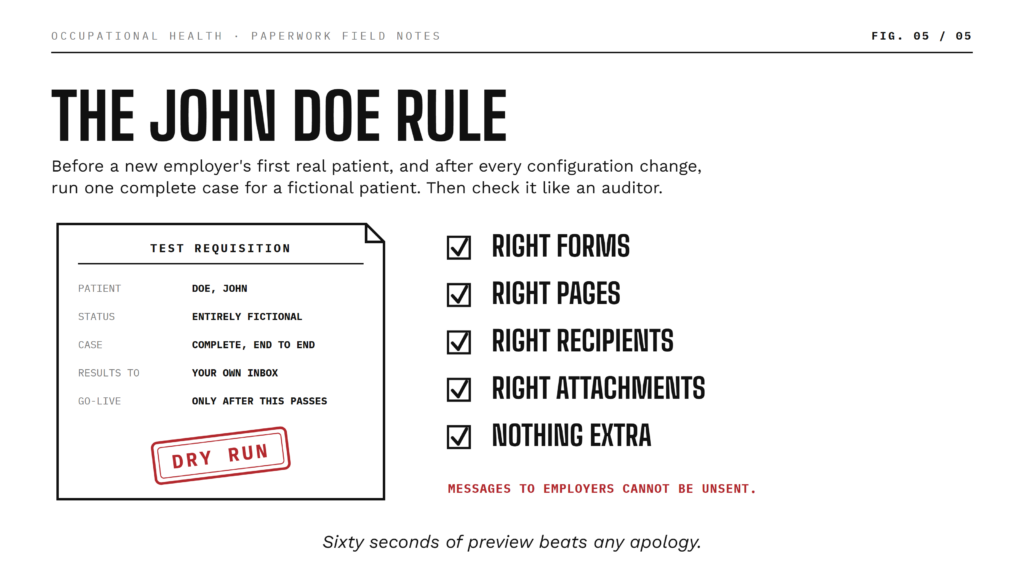
Call it the John Doe rule: before any new employer’s first real patient, and after every configuration change, run a complete test case for a fictional patient. Complete the paperwork end to end, generate the employer deliverable, and send it to an internal address.
Then verify like an auditor: right forms, right pages, right recipients, right attachments, nothing extra.
Messages to employers cannot be unsent. Sixty seconds of preview beats any apology you will ever have to write.
Most clinics will never “test” their own plan
Yes its awkward to fill out a form for a pretend patient and its weird doing a mock physical on an empty chair. Btu this is what makes your clinic better an the rest. Test before the first patient!
Renewals: the best repeat business you will ever get
Certificates expire. DOT certificates in particular expire on a schedule, which makes renewals the most predictable repeat business in occupational health. Keep a list of upcoming expirations and work it monthly.
One strong recommendation from hard experience: skip the automated reminder blast. Return rates on automated renewal messages are dismal, and wrong-number or wrong-person messages generate spam complaints and consent headaches you do not need. Personal phone calls, by contrast, consistently produce return rates above fifty percent, because a real conversation books the appointment on the spot. Make the monthly renewal call list a named person’s job, and manage consent and opt-outs properly in whatever communication platform you use.
Billing, scheduling, and contracts: out of scope, not out of mind
Three pillars of an occupational health practice sit outside the paperwork program, and you need answers for them elsewhere. But each one touches your paperwork in exactly one place, and those touchpoints are worth naming.
Billing. Run it in your practice-management system. The touchpoint: an internal billing summary can live alongside the case paperwork, never shared, so the packet is complete for your back office.
Scheduling. Book however you book. The touchpoint: the intake link belongs in the booking confirmation, so the patient portion is complete before arrival. This is the single biggest throughput win available to a busy clinic.
Contracts. Negotiate and store them wherever your business does. The touchpoint: every promise a contract makes about paperwork, meaning forms, turnaround, recipients, and pages, must land on the employer’s protocol sheet. The contract is the promise; the protocol sheet is the operational truth. If the two disagree, you will find out at the worst possible time.
The day-one checklist
Three lists. The first is done once, before any employer. The second is done once per employer, before their first patient. The third never ends.
A. Program design, before anything else
- Service catalog written: every visit type defined with inputs, the visit, and outputs
- Two-document rule adopted; standard determination letters drafted with no narrative fields
- Document taxonomy and naming convention agreed
- Employer protocol sheet template adopted
- Custom-form decision gate adopted; an owner assigned for every accepted form
- SOPs written: same-day completion, corrections, records export, outbound monitoring, accommodations
B. Per employer, before their first patient
- Protocol sheet completed with the employer and signed off internally
- Systems configured from the sheet: recipients, documents, pages, delivery
- Services linked and the email cadence chosen
- Consent arrangement confirmed
- End-to-end John Doe test passed, including a preview of the employer deliverable
- Review date set; sheet filed in the SOP binder
C. Ongoing, forever
- Outbound results reviewed monthly by a named person
- Completed paperwork finished and filed same-day
- Records landing in your system of record reliably
- Monthly renewal call list worked by a named person
- Protocol sheets reviewed annually and at every contract change
- New hires trained from the SOP binder, not from memory
Bottom Line: Start clean, stay clean
None of this is glamorous. That is rather the point. Occupational medicine rewards clinics that treat paperwork as a designed product rather than an administrative afterthought, because in this line of work the paperwork is what the customer actually receives.
As a new entrant, you have the one advantage money cannot buy back later: zero debt. A written program, a small standard catalog, disciplined information flows, and a test before every go-live will keep it that way. Start properly on day one, and six months from now your program will be the one that veteran competitors quietly wish they could rebuild from scratch.
This article is operational guidance only, not legal or medical advice. Paperwork, protocols, and information-sharing practices must comply with federal, state, and local law. Validate your program with your own legal counsel and medical director.
Back to the Latest MedFiller News and Updates