
The Ultimate Online DOT Physical Exam Software
Still using paper DOT forms or antiquated software for DOT Physicals? Manually uploading every DOT Physical result to the NRCME? Losing revenue by not tracking and calling back drivers for renewals? Try MedFiller for free for processing and electronically submitting DOT medical exam results to the DOT.
MedFiller is a modern web platform for conducting paperless DOT medical exams. With a mobile friendly patient form filling experience and software guided data analysis and decision making for examiners, MedFiller makes the entire exam a breeze for everyone. Results are automatically and instantly (without any delay) uploaded to the FMCSA/NRCME the moment an exam is completed. The process is seamless for drivers, front-desk staff, and DOT-certified examiners – with detailed guidance for everyone along the way.
MedFiller even integrates with popular EMRs and appointment booking systems – patients get a link to complete the form when they book an appointment and the exam documents (form, certificate and any linked files) are posted back to the patient charts in your EMR!
Watch our demo videos to examine how MedFiller automates DOT exams, or start your free trial today!
Fewer State Rejections. Fewer Dissatisfied Drivers
A big chunk of National Registry errors and state kickbacks come down to just a few issues: the driver’s name, DOB and license number. One transposed digit or misspelled name and the state bounces the exam back — which means a frustrated driver returning to your clinic, an unhappy carrier on the phone, and staff time burned on rework.
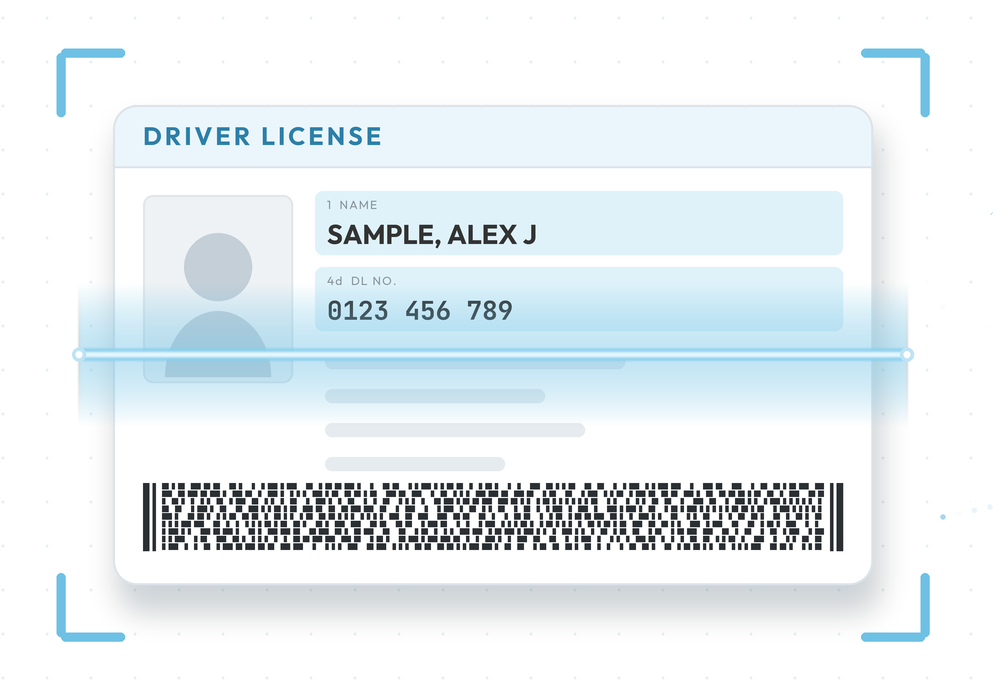
MedFiller takes typos out of the equation. At intake, the driver’s license and barcode on the back are scanned automatically, and the name, license number, and date of birth are captured character-for-character — exactly as the state issued them. What gets submitted matches what’s on the card, every time.
Fewer kickbacks. Fewer returning patients. A calmer front desk, and a better experience for your staff and your clients
Save Time
Automatic NRCME submission + certificate creation eliminates the need to manually handle physical exam results, saving significant time for medical examiners and administrative staff.
Easier & Faster Physicals
Harness the power of AI to reduce risk of human errors and deviations from DOT standards. Pass/Fail checklists and on-screen DOT published guidelines to help with complex cases.
Total Case Management
Pull up past DOT physical exams for patients, giving a historical case overview. Keep track of upcoming renewals for increased revenue through return bookings.
MedFiller DOT Demo Video
Features for DOT Examiners
- Instant electronic submission of exam results to the FMCSA/NRCME. No need to log in to the DOT and submit the results
- Form processing guidance and help for case-specific medical concerns. Direct links to DOT guiding documents for easier decision-making during complex cases
- Fully electronic and paperless: Patients sign electronically and can be emailed a copy of their exam and/or certificate immediately after the physical
- EMR Integrations: Files moved to patient charts without any scanning or uploading. Patients emailed a link to complete the form the moment they book a physical
Features for Clinic Operators
- Fewer state level rejections and reduced number of exams stuck in “pending”: MedFiller ensures error free data entry for driver license details and also allows patients to upload their medications, test results and supporting documentation during intake. Drivers can provide documentation for review well before their appointment.
- Keep track of upcoming renewals. MedFiller reminds you of patients with expiring certificates so that you can schedule them for renewal. Your patients always remain your patients.
- Employer and Third Party Portal: MedFiller is a full-featured occupational health system that can capture HIPAA releases/waivers to report and send results to employers. If you perform DOT exams for employers, your clients have access to the MedFiller employer portal, where they can authorize new exams/pre-employment physicals and download documents.
- External system and EMR integrations for better clinical workflows.

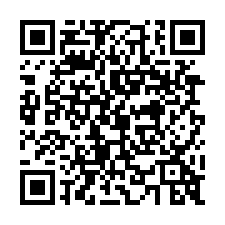
Scan to Start DOT Physicals
Features for Patients
- Modern user experience. Error-free forms with immediate results and valid certificates via email. Drivers can scan a QR Code on their phone or click on a link on your website to start their DOT Physical. You can allow patients to do their paperwork and lock in DOT patients even while your clinic is closed!
- Well-organized and detailed guided instructions in multiple languages to make the process/form filling easier for patients. No more hand-holding for patients filling out their forms!
- Cut and fold “DOT cards” with the clinic logo and renewal reminders
- Get detailed patient histories with fewer wait conditions. Patients can upload supporting documentation (prescriptions/waivers) ahead of appointment leading to fewer “pending results” and call-back related issues at the clinic
- Results relayed to the employer without delay
Get started with a free, full-featured and no-obligation trial of MedFiller today!
Try MedFiller for free! Create your own MedFiller account and do your first patient physical within the next 5 minutes. No tech-skills required, no obligation to pay after trial.
Not ready to start utilizing your free trial? Not a problem! Schedule a no-pressure in-depth technical demo with our ‘anti-sales’ team to see MedFiller in action in real time
MedFiller for DOT Physicals Frequently Asked Questions
MedFiller pricing is openly published and available here. MedFiller offers the DOT module at a flat-rate of $59/month per examiner with unlimited use, unlimited number of exams and unlimited number of non-examiner users (support/front-desk staff) in your MedFiller account.
No. MedFiller for DOTs is month-to-month. There are no lock-ins or long term contracts. With our open data export integrations, each and every DOT physical form and certificate can be sent to a record keeping system of your choice including your email inbox, Google Drive or Microsoft One Drive. That way your data and patient records always remain in your possession. You can stop using MedFiller at any time!
There are many ways a driver can start their portion of the DOT Physical. They can
1. Scan a QR code at your front desk or office
2. Click a link on your website
3. Be sent a text-message or email from within MedFiller with the link to start the physical
4. Be automatically directed by your EMR or booking system to start the intake once an appointment is booked
5. Be directed to MedFiller through an employer specific integration
MedFiller supports many other workflows for EMRs and booking systems so please don’t hesitate to reach out. You can watch our demo video explaining the various intake methods. You’re also welcome to try out the intake yourself: Click here to start a demo intake where you can pretend to be a patient and complete the patient portion a physical yourself!
You can create an unlimited number of “staff” users in your account without any additional costs (yes absolutely free).
MedFiller connects to your EMR and matches the patient identifiers (Name, DOB, License #, Address etc.). If a certain and positive match is reported by your EMR, MedFiller will upload all documents associated with a DOT Physical to the EMR for that patient chart.
An EMR connector is required and for many EMRs this is free of cost from our side. Your EMR however, may charge us or you for uploading documents into patient charts. We therefore recommend you get in touch for more details. Generally such connectors are not cost-efficient for individual owner operators of smaller clinics. Remember: You’re always welcome to use one of our many free/open HIPAA compliant data export integrations (Email, FTP, Google Drive, One Drive etc.) to export all forms and documents without any additional costs
MedFiller believes in free/open (zero cost) interoperability and data exchange across systems and you’re welcome to read our EMR integrations policy on this matter.
Yes you can! Read more about our EMR integrations policy here. You can also export forms to most open HIPAA compliant storage systems such as Google Drive or Microsoft One Drive without any additional costs. You can even have a copy of every DOT physical that you complete emailed to an inbox of your choosing.
Absolutely. MedFiller has several EHR and non-EHR connectors to booking systems. Patients can be sent instructions to securely complete their physical form the moment they book an appointment! Reach out to our support team for questions.
Absolutely. MedFiller for DOTs comes with the most common clearance letters (hypertension, sleep apnea, diabetes, vision, cardio, seizures etc.) built in. If you’d like to author your own letters you may want to look at our custom forms solutions.
Yes. You can customize every detail including the emails that are sent, the welcome message (before you start page), have your own logo and set controls on which fields/data you must absolutely get from the driver.
Yes. MedFiller can allow patients to translate exam questions to Spanish. Please note because of the recent language guidelines published by the DOT, this feature can be disabled by individual clinics and examiners.
MedFiller is SOC2 certified and has support for various external SSO based authentication mechanisms. There are also features to manage users across an eco-system of related but separate clinics including HIPAA compliance and monitoring, access and audit logging. Most of these feature are available only to our Enterprise clients (10+ clinics or 20+ examiners).
Absolutely! One of our team members will be glad to do a “mock-physical” with you over Zoom and show you the various features in MedFiller. Click here to schedule a demo. Alternatively you’re also welcome to create your own no obligation no-strings attached 30 day free trial account and get started.