Find New DOT Physical Clients Near Your Clinic
MedFiller DOT Carrier Connect shows you every active trucking and bus company registered with the FMCSA near your clinic, updated every day. Get an email every day when a new trucking company registers near you, so you can be one of the first to reach out. Then call or email them from your own phone and inbox, and keep track of every conversation with your team.
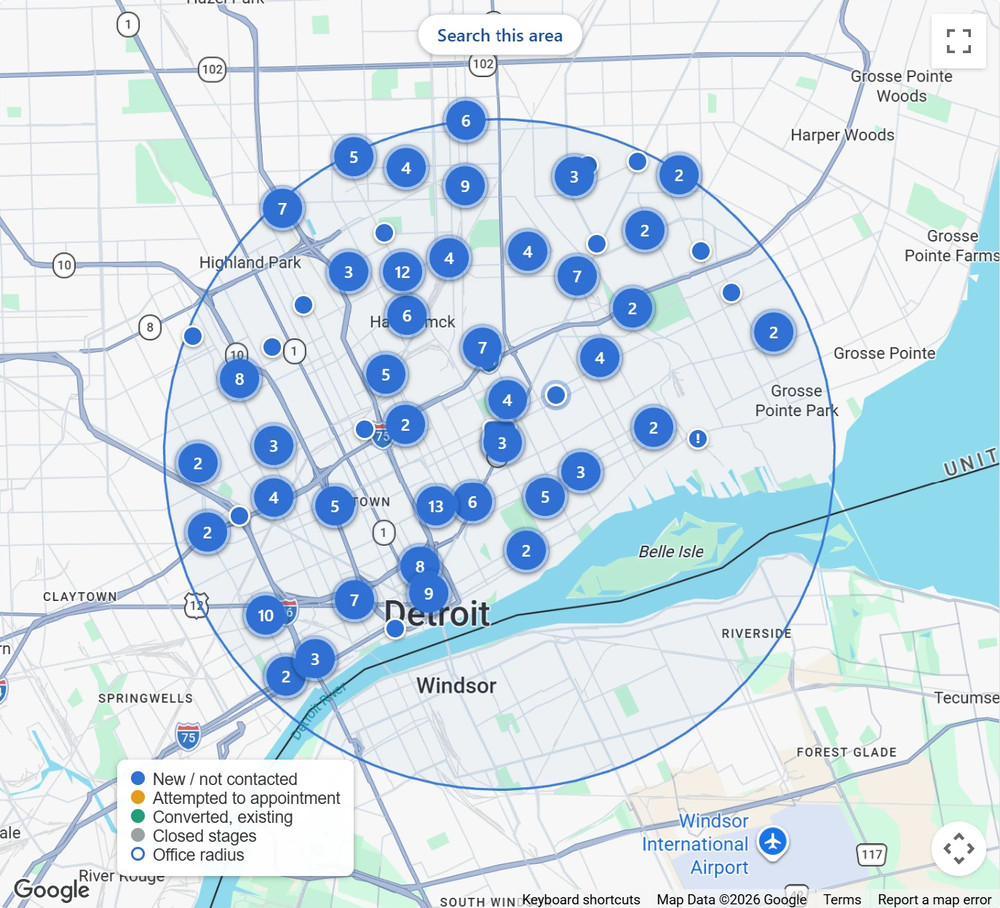
Your next DOT clients are already down the street
Every company that runs commercial trucks or buses registers with the FMCSA, and every one of their drivers needs a DOT medical card at least every two years. Most clinics wait for those drivers to walk in. DOT Carrier Connect gives you the list, so you can introduce yourself first.
A 20-driver fleet means about 10 DOT physicals a year, before you count new hires.
Every carrier near you
Company name, address, drivers, vehicles, cargo, phone, email and company officer, straight from the federal register.
Know the day they register
Get a daily email when a new trucking or bus company registers near you, and see which companies just reported more drivers. Reach out while they're still looking for a clinic.
One shared team CRM
Your whole team sees the same stages, notes and follow-ups. No spreadsheets and no double calls.
How MedFiller DOT Carrier Connect works
Four steps you can fit into a few minutes a day.
1. Find
Browse the list or the map of trucking and bus companies near your clinic. Filter by fleet size, drivers, cargo and more.
2. Pick
Start each day with ten daily picks, chosen for size, timing and how long since anyone reached out.
3. Reach out
Open your own email template or call script, already filled in for that company, and send it yourself.
4. Follow up
Log the call or email, set a follow-up date, and get it back in your daily email when it's due.
See every trucking and bus company near your clinic
List, map or both side by side. Companies are placed right on their street, sorted nearest first, with drivers and vehicles on every row.
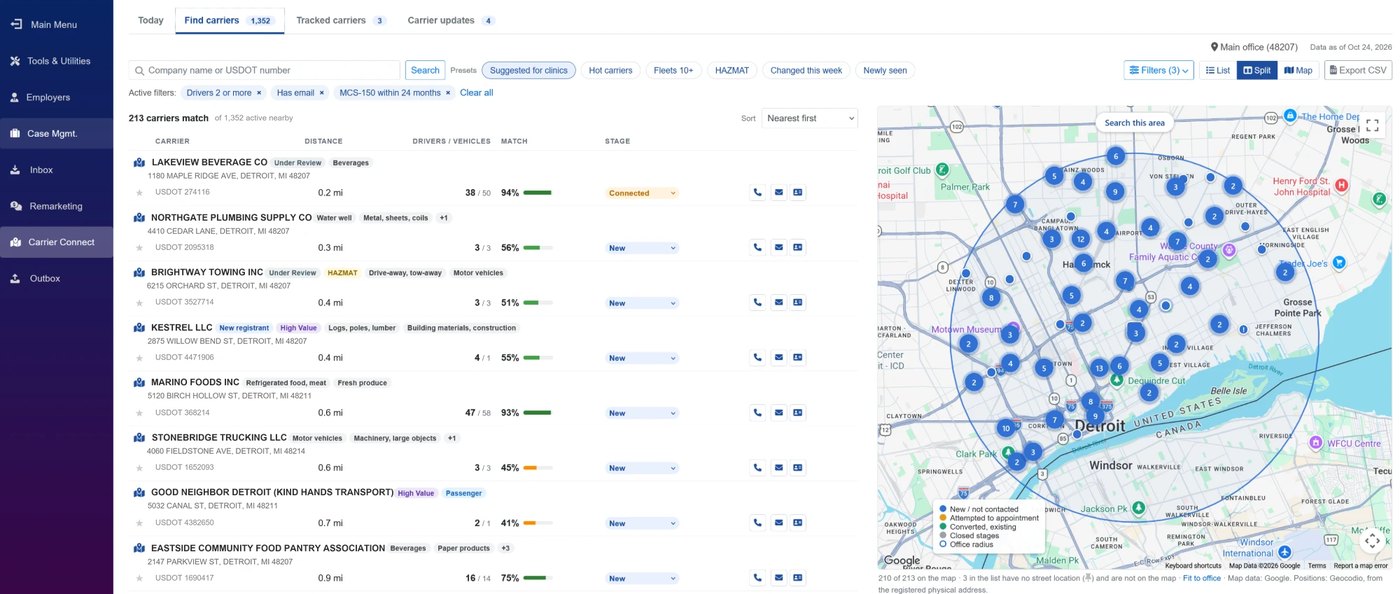
- Ready-made presets. Suggested for clinics, Hot carriers, Fleets 10+, HAZMAT, Changed this week and Newly seen.
- Filters that matter for DOT. Fleet size, drivers, cargo, interstate or intrastate, safety rating, and phone or email on file.
- Search and export. Look up any company by name or USDOT number, and export your list to CSV for your own outreach.
- Updated every day. New registrations, filings and changes from the FMCSA register show up without you lifting a finger.
Know which companies are worth your time
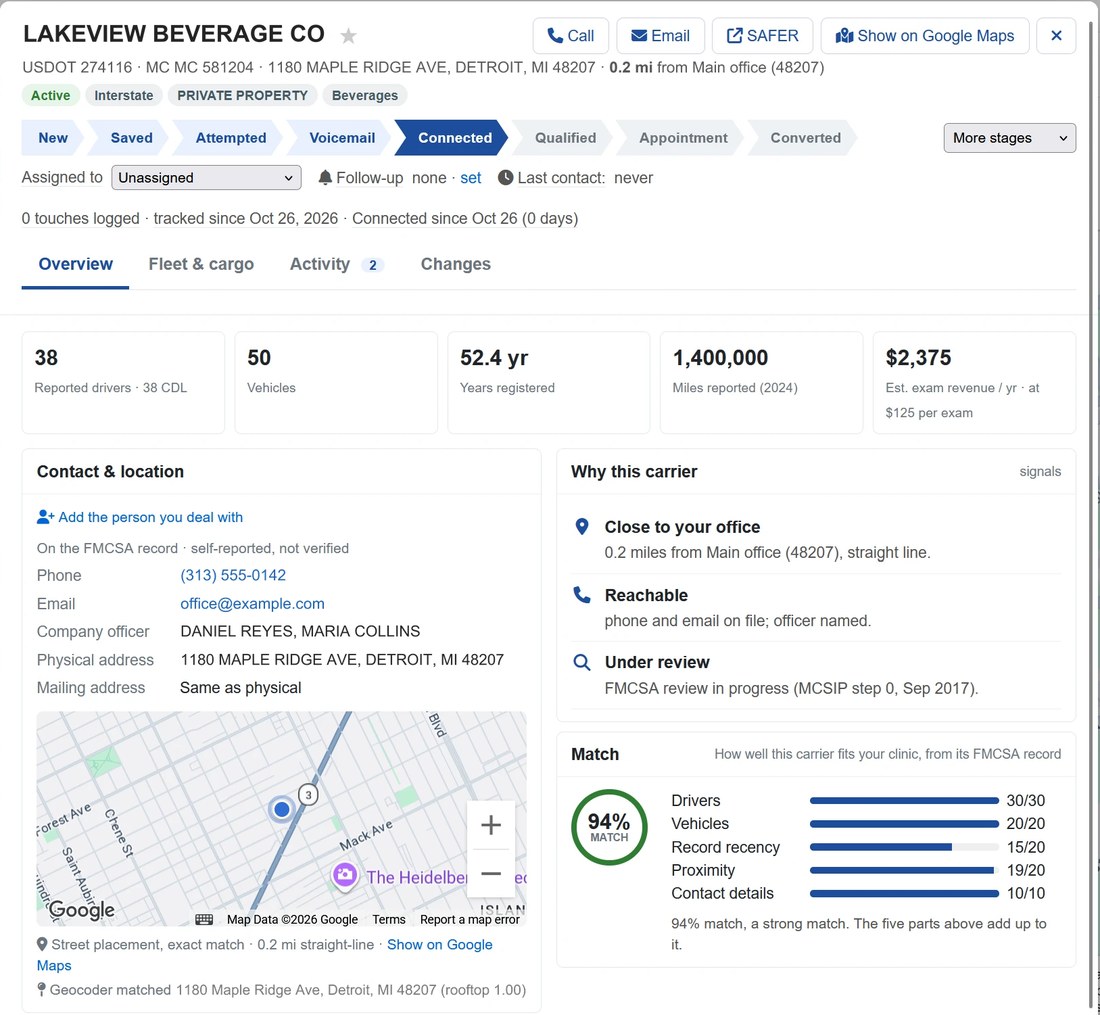
One click opens a company's full picture: reported drivers and CDL holders, vehicles, years registered, miles driven, and an estimate of yearly exam revenue at your own exam price.
- A match from 0 to 100%. Drivers, vehicles, how fresh the record is, distance and contact details, so the best fits rise to the top.
- Badges at a glance. Hot, New registrant, High Value, HAZMAT, Passenger, Under Review and more.
- The full record. Fleet and cargo, safety details and two years of changes.
- Your own contact. Add the safety manager, dispatcher or owner you actually deal with.
Call at the right moment
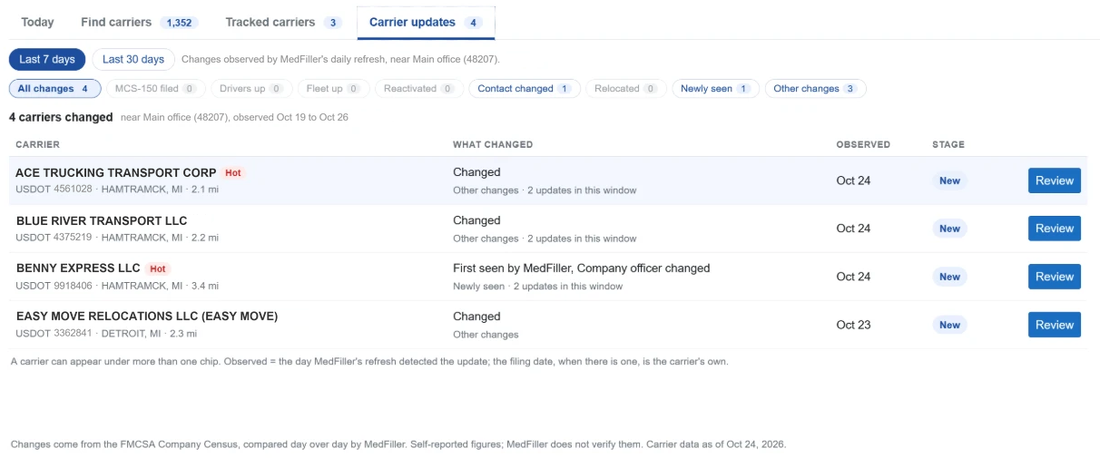
FMCSA records change every day. DOT Carrier Connect compares them for you and points out the companies that just did something worth a call.
- New registrations. Brand-new companies rarely have a clinic yet, and they land in your inbox the day they show up.
- More drivers. More drivers means more medical cards due soon.
- Reactivated, moved or a fresh filing. Current contact details and a natural reason to reach out.
- One feed for all of it. Carrier updates lists every change near you over the last 7 or 30 days, with a tip on how to use each one.
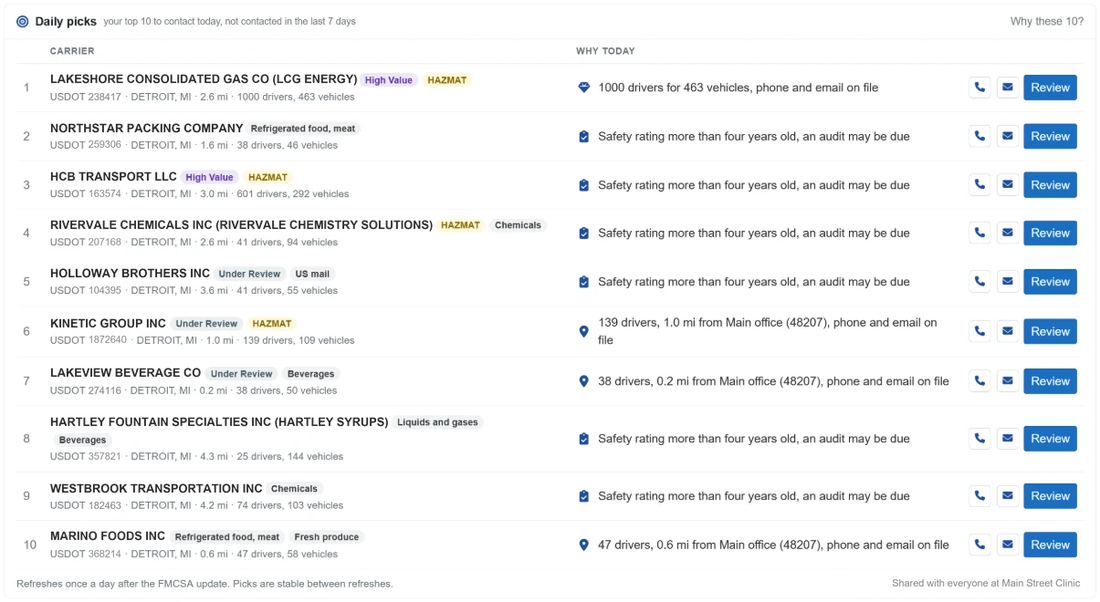
Ten daily picks, so outreach actually happens
The Today screen hands you ten carriers to contact, picked for size, timing and how long since anyone reached out, with the reason each one made the list.
- Ten new picks every day. Anyone your team contacted in the last 7 days is left out, so nobody gets two calls in a week.
- The reason, right there. More drivers this week, a fresh filing, a safety audit that may be due, or simply a large fleet close by.
- Call or email in one click. Each pick opens your own call script or email template, already filled in.
- Shared with your team. Everyone sees the same picks, next to the follow-ups due this week.
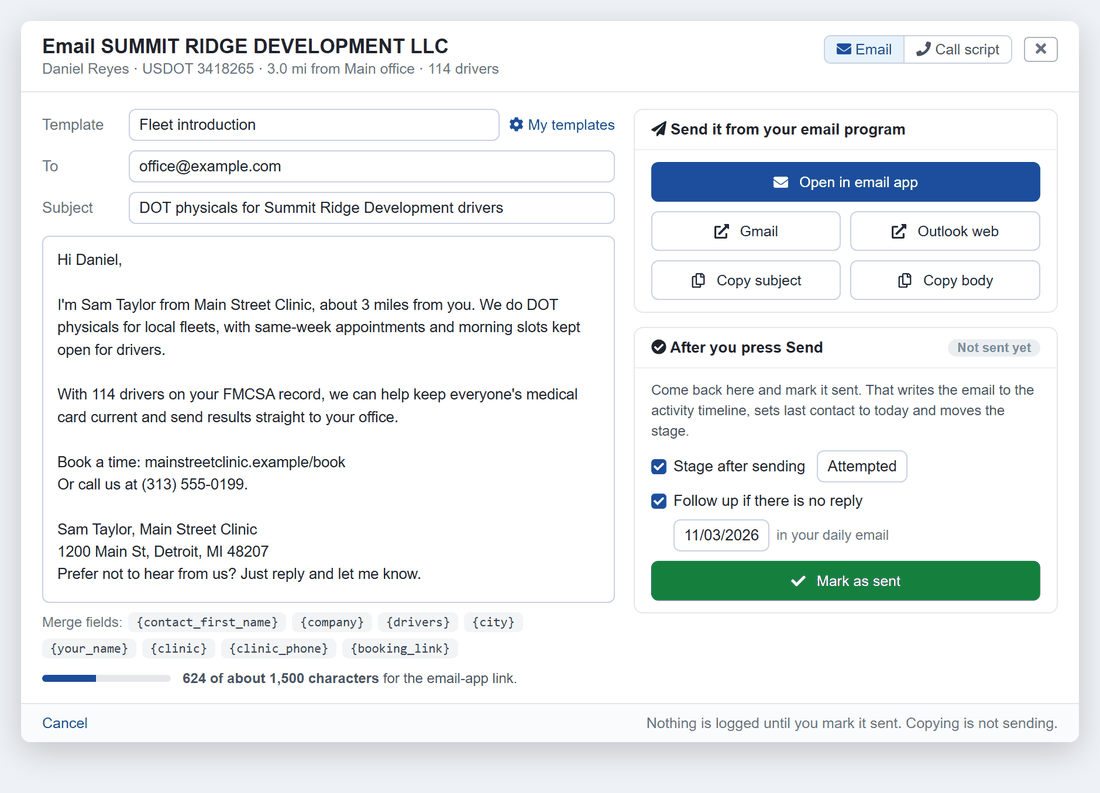
Reach out from your own phone and inbox
Pick a template or call script and DOT Carrier Connect fills in the company name, contact, driver count, your clinic, your phone number and your booking link. You review it and press Send yourself.
- Your own templates and scripts. Every team member keeps their own, starting from ready-to-use examples.
- Works with the email you already use. Open the draft in your email app, Gmail or Outlook, or copy it.
- One click to log it. Mark an email as sent or log a call, and set a follow-up date at the same time.
- You stay in control. MedFiller never emails, calls or texts a carrier for you.
Work your outreach as a team
A simple CRM for your DOT outreach. Move companies from Saved to Attempted, Connected, Appointment and Converted, assign each one to a team member, and everyone sees the same notes.
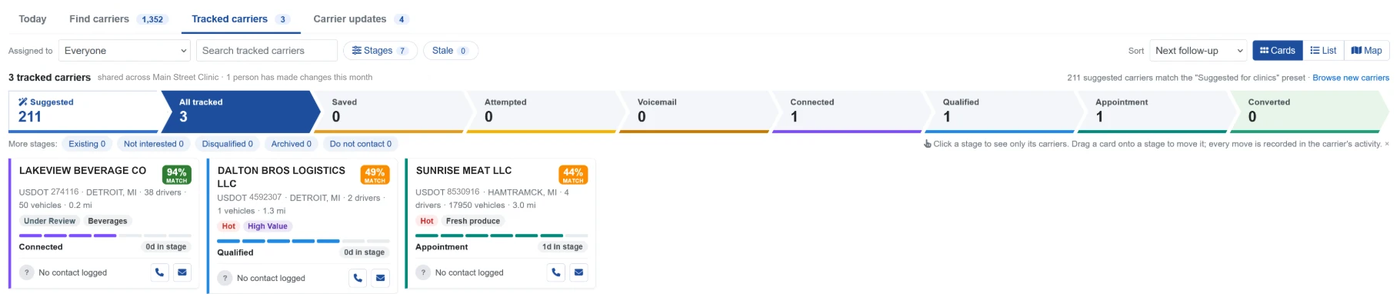
- Next actions. One list of who is overdue, due today and due this week, and which companies still have no next step.
- Follow-up reminders. Due follow-ups arrive in a daily email, with a link straight to the company.
- Nothing goes stale. Companies that sit too long without a next step are flagged so they don't slip away.
- New companies near you. An optional digest of newly registered carriers, daily, weekly or monthly.
- Private to your clinic. Stages, notes and contacts stay inside your organization.
From the first call to repeat business
MedFiller DOT Carrier Connect opens the door. The rest of MedFiller for DOT helps you keep every fleet you win.
Introduce
Find the fleets near you, make the first call and book the first drivers.
Examine
Drivers do their paperwork on their phone before the visit, licenses are scanned at intake, and results go to the NRCME the moment you finish. See MedFiller for DOT physicals.
Keep them
Renewal reminders bring drivers back before their cards expire, and the employer portal lets fleets authorize exams and download certificates.
Respectful outreach, built in
DOT Carrier Connect is designed to help you introduce your clinic, not to spam anyone.
Company details come from the FMCSA's public register. Companies report them themselves, so a few numbers will be out of date.
MedFiller never contacts a carrier for you. No texts, no auto-dialers and no bulk email.
When a company asks not to be called, one click stops your whole team from calling again.
The example emails include your clinic's address and an easy way for the reader to opt out.
MedFiller DOT Carrier Connect frequently asked questions
Where does the carrier information come from?
From the FMCSA's Motor Carrier Census, the public register every trucking and bus company must keep up to date to hold a USDOT number. MedFiller refreshes it every day. Companies report their own details, so treat phone numbers and driver counts as a starting point.
Does DOT Carrier Connect cost extra?
No. DOT Carrier Connect is free to use with your MedFiller for DOT subscription.
Can I try it before I subscribe?
Yes. It's part of your free trial when your trial includes DOT physicals.
Does MedFiller contact carriers for me?
No. DOT Carrier Connect prepares the email or call script, and you send it from your own email or phone. That keeps you in control of everything that goes out under your clinic's name.
Does a company on the list need exams right now?
Not necessarily. Interstate drivers need a medical card at least every two years, and many companies already have a clinic. Think of the list as your introduction. The steady business comes from renewals across the local fleets you build a relationship with.
Are the carriers exclusive to my clinic?
No. The information is a public record. DOT Carrier Connect tells you how many other MedFiller clinics use it near you, as a count only, never their names.
We have more than one location. How does that work?
Each of your offices can get its own list of carriers nearby. Ask us to add a location.
Who can see our notes and stages?
Everyone in your organization, and nobody outside it. Carrier details are public records; your notes, contacts, stages and activity are private to your clinic.
Free with your MedFiller for DOT subscription
MedFiller DOT Carrier Connect is included with MedFiller for DOT at no extra cost. Start a free trial and see the trucking and bus companies near your clinic today.
Create your MedFiller account and do your first patient physical within the next 5 minutes. No tech skills are required to get fully set up and there is no obligation to pay after the trial.
Not ready to start utilizing your free trial? Not a problem! Schedule a no-pressure, in-depth technical demo with our ‘anti-sales’ team to see MedFiller in action in real-time